

 Recommended
 Quality
 Value for Money
 Critiques from Users




If you spend a lot of time creating pitch decks, school presentations, or corporate slide decks, you will love DecksyAI, a strong AI presentation tool that prioritizes organization.
Professionals and students alike may benefit greatly from its capacity to convert raw prompts or documents into completely editable PowerPoint files, despite the fact that its template modification possibilities might feel stiff at times.
Introducing DecksyAI.com
The goal of the AI-powered presentation platform DecksyAI.com was to make making slides more easier. As an automated research assistant and designer, DecksyAI is a great alternative to traditional presentation software that needs users to construct decks manually, slide by slide, from a blank screen.
The platform is based on the principle of putting structure first. The underlying AI model takes in a prompt, outline, or source file and uses it to assess the narrative flow, create a logical division of sections, and build headlines for each slide before putting out the graphic elements. Students working under intense time constraints, teachers putting together presentation decks, and businesspeople getting ready to make presentations or post board updates will all find it an invaluable tool.
Important Features
Automatically converts large or small text files (such as PDFs, Word documents, or text notes) into well-organized slide sequences with descriptive titles, subheadings, and bullet points for the main body of the presentation.
The Smart Styling & Layout Engine mechanically applies color schemes, typographic hierarchies, and layout structures that have been authorized by designers. In order to avoid visual clutter, the AI considers the density of the material per slide and chooses the suitable card layouts, multi-column comparison formats, or timeline graphic structures.
Export in a native format and work across platforms: makes.pptx files that are fully editable in both Google Slides and Microsoft PowerPoint. After export, you may still make changes to any element, including text boxes, charts, and vector shapes.
To guaranty academic and professional rigor, the integrated deep research and citation manager uses multi-model AI logic to cross-reference online sources, extract up-to-date data, and put inline citations straight into slide footers.
An Assistant for Chatting and Granular Slide Editing: Provides an in-line AI editor that lets users alter individual slides with instructions like “Make this slide more concise,” “Convert these bullets into a 3-column benefit list,” or “Change tone to executive”).
Costs and Monthly Payment Schedules
The freemium price model that DecksyAI employs is meant to attract casual users and provides power users with adjustable restrictions.
No-Cost Plan ($0/month):
- 1 presentation created daily.
- Standard AI engine features and basic template access.
- Standard resolution watermarked exports.
- Docx and PDF are the two most common export formats.
Monthly Plan for Pro ($18):
- The production of AI presentations is endless.
- Unrestricted use of the Deep Research engine, which may automatically collect citations from the web.
- Add a brand kit, personalize color schemes, and access a library of templates.
- .pptx outputs with no watermarks and high quality.
- Faster processing times and individualized client service.
The Pro Annual Plan costs $119.88 per year ($9.99 per month):
- Save 45 percent on the regular price while getting all the Pro features.
- For new customers, there is a chance to try out full access for three days at no cost.
And in comparison with other subscription based AI presentation makers, Decksy has a pretty easy flow on how to cancel the subscription.

Contrast Between Quality Comparing With Market Leaders
We compared DecksyAI vs Gamma vs Tome vs SlidesAI main features and output performance to those of other leading AI presentation tools to find out where it stands in the current productivity environment.
| Feature / Metric | DecksyAI | Gamma | Tome | SlidesAI |
| Starting Price | Free / $2.99/mo | Free / $10/mo | Free / $16/mo | Free / $10/mo |
| AI Layout Engine | Structure-First | Web-Document Style | Canvas/Card-Based | Basic Extension |
| Native Editable PPTX Export | Yes (Full) | Limited (PDF-focused) | Limited | Yes |
| Integrated Deep Research | Yes (With Citations) | No | No | No |
| Custom Brand Kit Support | Yes | Yes | Yes | No |
| Ease of Learning Curve | High (Intuitive UI) | High | Moderate |
The export fidelity is the main differentiator between DecksyAI and its rivals, such as Tome and Gamma. While Gamma shines in document-style presentations that are natural to the web, DecksyAI is tailor-made for the more conventional PowerPoint setting. Academic and analytical presentations benefit greatly from its built-in automatic research and citation tool.
Cost-Effectiveness and Customer Feedback
Those that use DecksyAI on a regular basis will see a significant return on investment when considering the product’s worth. From start to finish, it usually takes from two to five hours to design a 15 to 20 slide presentation. Instead of spending time wrangling with layout alignment and color palettes, users can spend that time honing the content thanks to DecksyAI, which cuts this initial creation time to less than 10 minutes.
Decksy Reviews
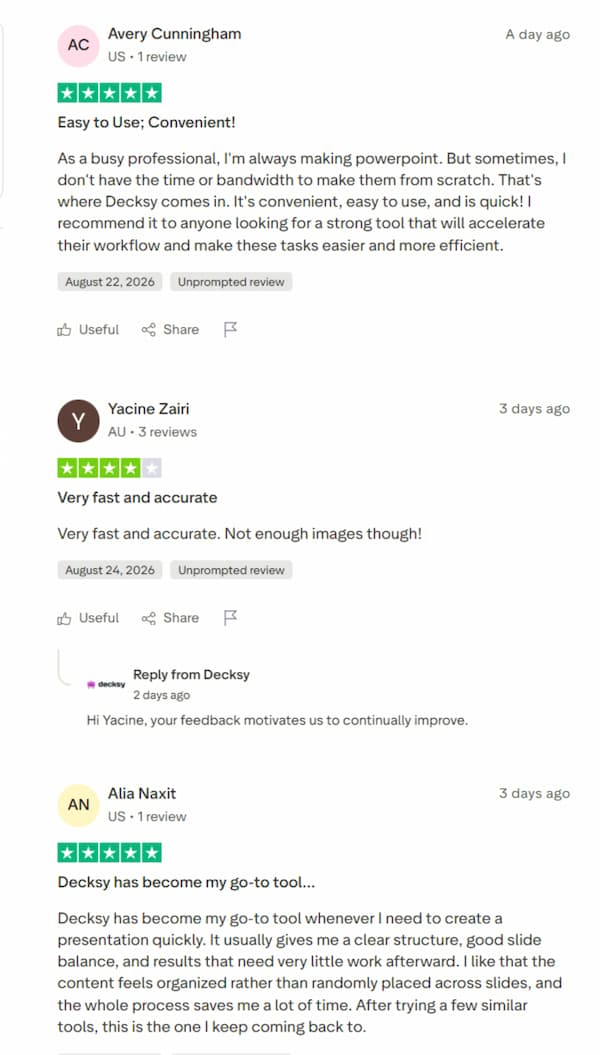
“With DecksyAI, I was able to save my academic term as a university student juggling four modules. In about two minutes after uploading my paper idea, I got a fully-structured 18-slide presentation complete with citations. After spending only ten minutes fine-tuning the text in PowerPoint, I was all set to give the presentation.
The use of misaligned or off-brand slides is completely prohibited in the management consulting industry, according to Elena R., a master’s student. On the first attempt, DecksyAI correctly identifies the color hierarchy and layout grid 90% of the time. My team may make adjustments to the figures right in PowerPoint thanks to the editable PPTX output.
A senior strategy consultant named Marcus V.The formatting requirements of curricular presentations and parent-teacher nites used to make me very nervous. In an instant, DecksyAI transforms my instructional ideas into visually appealing presentations.”
— Sarah T., Teacher at the Secondary Level
FAQ
Can I use DecksyAI for free?
You may generate one presentation every day with access to standard layout templates using DecksyAI’s free plan. Unlimited deck creation, superior deep research capabilities, and watermark-free exports are all available to subscription plan users.
Are PowerPoint files that can be edited exportable?
Yes. With DecksyAI, you can export presentations in their native.pptx format, unlike other systems that force you to use proprietary web formats or static PDFs. Microsoft PowerPoint or Google Slides makes it easy to open, modify, and reformat these files, as well as show them.
I thought I could make my presentation using ChatGPT; why couldn’t I?
Even while ChatGPT can make useful text outlines, it isn’t good with things like visual hierarchy, slide composition, typographic scaling, color palette distribution, or accurately aligning elements. DecksyAI is able to transform narrative information into completely designed visual slides in a single step by integrating a layout engine with text production.
Does DecksyAI handle document formatting automatically?
Yes. Simple text files, PDFs, or Word documents are all acceptable uploads. Automatically organizing the information into visual layouts, the AI pulls the main narrative strands, and divides the data into logical slide parts.
- Rapid Outline-to-Slide Generation: Creates coherent slide decks from scratch in less than two minutes from uploaded Word documents, unstructured notes, or raw subject prompts.
- Instead of downloading flattened PDFs or locked photos, you may export fully editable PowerPoint files using Google Slides. This allows you to directly alter shapes, fonts, and text.
- To prevent the fragmented slides seen in less advanced AI technologies, the Structure-First Engine puts an emphasis on logical narrative progression and visual hierarchy before implementing style.
- The Deep Research Engine greatly improves the credibility of academic publications and analytical business presentations by integrating real-time data research with automatic citations.
- With automatic layout adjustments, your text boxes will be aligned, icons will be snapped to grid systems, and color contrast standards will be enforced worldwide.
- For really complicated, non-standard layout designs, the rigidity of pre-set visual themes could be a real turnoff.
- On rare occasions, PowerPoint may experience formatting issues that need manual modification, such as when exporting extremely lengthy bullet points or complicated nested tables.
- The free plan has limited access to sophisticated capabilities including complete Deep Research and bespoke brand kit uploads, as well as daily slide generating restrictions.